Stop stickering.
Start scanning.

Scan the item as it sells and the platform order is tied to the real SKU in your inventory, so the stock stays on the shelf and the packing list is done when the stream is.

We reply personally. No newsletter, no card.

What it does
ConsoleScan the barcode as it sells and that order number is tied to the real product
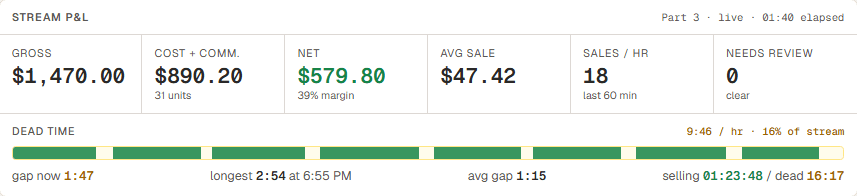
Stream P&L + dead timeProfit for the stream so far, and the dead time between a sale coming in and the next scan, visible live
Packing list exportA list that says which product goes in which order, and where it is stored
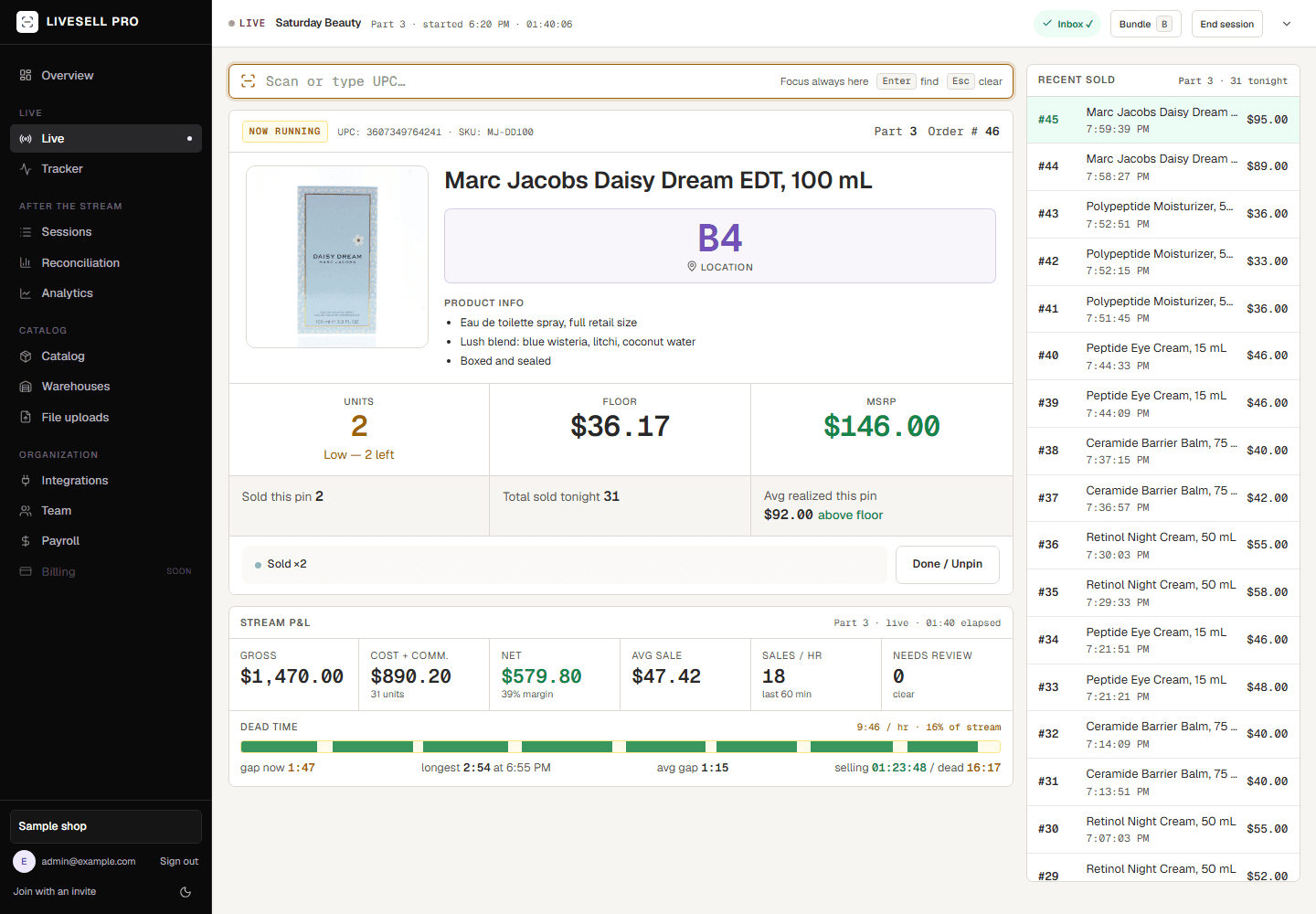
LiveSell Pro live console with sample data: scan box, lot card for the Marc Jacobs Daisy Dream lot being sold with its photo, storage location, units, floor and MSRP, stream P&L and dead time, and the recent sold list
The basics
Stream from your phoneThe console runs on a laptop beside you
Any barcode scannerUSB or Bluetooth, keyboard mode
Used on our own streamsLive beauty auctions on TikTok Shop
Everything exports to CSVIncluding after you cancel
The labor problem

The pile is where the labor goes.

Carrying every sold unit to packing during the stream, then finding each order in the pile by sticker number at ship time. At a few hundred units a stream that is payroll.

During the stream

Units move once, from the shelf to the package.

With stickers, every sold unit is carried to a pile during the stream and dug back out of it at packing. With scanning, the unit stays in its storage location until a packer pulls it for that order.

At packing

Storage location on the export.

The platform only knows an order number. Scan a display unit as it sells and that number is tied to a real SKU, cost and shelf location in your inventory. Packers pull each order from where it is stored, straight into the package.

Cancelled orders

Never pulled.

Nothing moves during the stream, so a cancelled order was never pulled at all. There is nothing to find in the pile and nothing to put back.
Per streamStickersLiveSell Pro
Moved during the streamEvery sold unit, to the packing pileNothing
Done at the moment of salePeel, stick, carryScan the display unit
Finding an order to packRead sticker numbers off the pileStorage location on the export
Cancelled ordersFound in the pile and re-shelvedNever pulled
Matching orders to productsBy hand, sticker by stickerDone at the scan
During the stream

Scan it and the order knows what it is.

Scan the UPC or type it and press Enter to pin the lot. Each order that comes in from TikTok is tied to that product, and the stock count for that warehouse drops by one. You can put several items under one order number for bundles, and start a new part every so many orders if that is how you run.

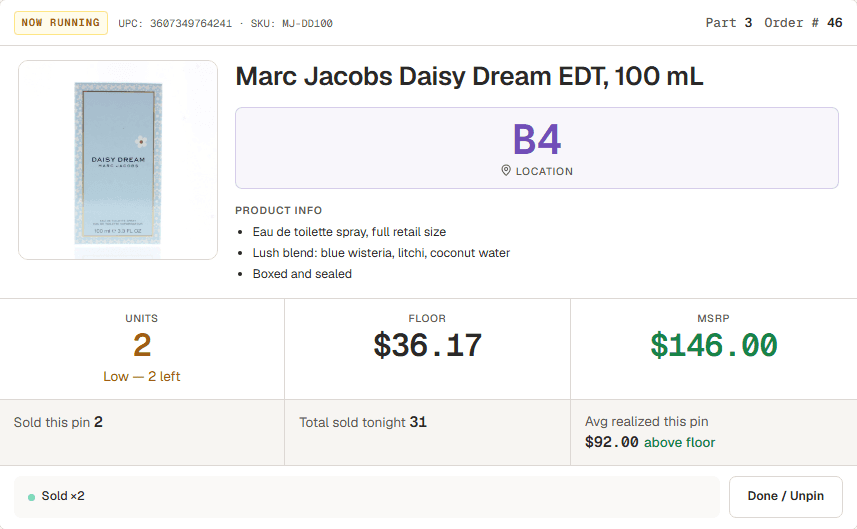
The lot card for a scanned product, sample data: NOW RUNNING header with UPC and SKU, part and order number, the Marc Jacobs Daisy Dream bottle photo, storage location, product info, units in stock, floor and MSRP, units sold, and the Done / Unpin button
While it runs

See the stream’s P&L while it is still running.

The lot card shows the floor (cost plus commission), MSRP and what is in stock for whatever was just scanned. Under it, the stream P&L and the dead time between a sale coming in and the next scan update as you go.

Stream P&L block, sample data: gross, cost plus commission, net, average sale, sales per hour, needs review, and the dead time bar with gap now, longest, average gap and selling versus dead time
After the stream

The reconciliation is already done.

One row per sale with the part, order number, SKU, product and cost. That is the link between the platform’s order and your actual inventory, and it exists the moment the stream ends. Give it to the packers or a supplier, or load it into whatever system you already use. The columns stay the same from version to version so nothing downstream breaks.

reconciliation.csv
Part#Order#SKUProductCost
341DRX-PM50Polypeptide Moisturizer, 50 mL26.00
342DRX-PM50Polypeptide Moisturizer, 50 mL26.00
343DRX-PM50Polypeptide Moisturizer, 50 mL26.00
344MJ-DD100Marc Jacobs Daisy Dream EDT, 100 mL34.00
345MJ-DD100Marc Jacobs Daisy Dream EDT, 100 mL34.00

From the warehouse shelf to the customer’s package, without the pile in between.

The platform only knows an order number. Scan a display unit as it sells and that number is tied to a real SKU, cost and shelf location in your inventory. Nothing moves during the stream. Packers pull each order from where it is stored, straight into the package, and a cancelled order was never pulled at all.

Background

We built it because nothing else could keep up with our own streams.

LiveSell Pro was built by an operator running live beauty auctions on TikTok Shop, and it runs every one of our own streams. It was built for that job first, processing our own seven-figure annual sales volume. Next on the list: TikTok Shop order sync and scan-verify packing.

Changelog

  • Sep 20, 2026Streams index redesigned as a stream finder
  • Sep 19, 2026Live console rebuilt for a single monitor
  • Sep 19, 2026Stream P&L and dead time, live
Everything that shipped

Roadmap

  • in progressTikTok Shop order sync
  • plannedScan-verify packing
  • plannedWhatnot
  • plannedSelf-service billing
What is next

FAQ

Does it connect to TikTok Shop?

Order sync is in development. Today the export gives you the order-number-to-product mapping the platform does not have, and you fulfill in TikTok Shop as usual.

What about Whatnot?

Planned after TikTok. No date yet.

Can I use my phone?

You stream from your phone as usual. The console runs on a laptop beside you, where the scanner is. One screen.

What scanner do I need?

Any USB or Bluetooth scanner that acts as a keyboard. You can also type the UPC or search by name.

Who owns my data?

You do. Everything exports as CSV, including after you cancel.

Is it in production?

Yes. It runs our own live beauty auctions on TikTok Shop every stream, processing seven-figure annual volume. You get the same software we use.

How do I get access?

Enter your email in the form and we will reply personally, usually within 1 business day, with an invite or a short walkthrough. There is no card and no waitlist counter.

Try it on your next stream.

Request access and we will reply personally. If it is not for you, export your data and go.

We reply personally. No newsletter, no card.